Showing posts with label Office 365. Show all posts
Showing posts with label Office 365. Show all posts
Wednesday, November 15, 2017
How to become the perfect SharePoint / Office 365 Business Analyst - Collab365 Community
How to become the perfect SharePoint / Office 365 Business Analyst - Collab365 Community: The session for the SharePoint / Office 365 guy or gal who doesn’t quite fit in anywhere else in the world of SharePoint & Office 365. You may work with end users, manage sites, help others or meet with users discussing their business needs and documenting how to build a project that fulfils their needs. …


Friday, June 09, 2017
Wednesday, July 08, 2015
Microsoft Taking a 'Cloud First' Approach with SharePoint 2016
Microsoft Taking a 'Cloud First' Approach with SharePoint 2016
Microsoft Taking a 'Cloud First' Approach with SharePoint 2016
SharePoint Server 2016 will be a very cloud/inspired product when commercially released next year.
That idea seemed to be the main theme of a recent SPBiz Conference keynote talk by Mark Kashman, a senior product manager at Microsoft on the SharePoint team. Kashman's June 17 talk, "SharePoint Vision and Roadmap," offered a high-level view of SharePoint Server 2016, explaining its Office 365 origins. Microsoft is planning a beta release of the new server at the end of this year, with product release planned for Q2 2016.
That idea seemed to be the main theme of a recent SPBiz Conference keynote talk by Mark Kashman, a senior product manager at Microsoft on the SharePoint team. Kashman's June 17 talk, "SharePoint Vision and Roadmap," offered a high-level view of SharePoint Server 2016, explaining its Office 365 origins. Microsoft is planning a beta release of the new server at the end of this year, with product release planned for Q2 2016.
Microsoft's cloud services have been looming in the background of prior SharePoint Server releases. Kashman illustrated this concept with the following slide:
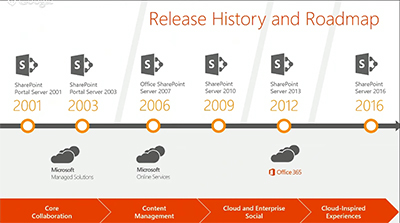
Office 365 cloud services have played a role since SharePoint Server 2013, and they will do so going forward with SharePoint Server 2016. "Everything we're doing in Office 365 inspires the [SharePoint Server] product going forward, and you'll see this cadence continuing," Kashman explained.
Office 365 is Microsoft's fastest growing product yet, and SharePoint Online is a "huge" part of that, Kashman said. Some of the four workloads in SharePoint Online have been growing at a rate that's been beyond Microsoft's expectations. They've grown since last year at a "400 percent monthly active user rate," Kashman said. And across sites with OneDrive for Business, Microsoft is seeing a "300 percent year-over-year growth."
SharePoint Server 2016 will have a more unified end user experience across components, Kashman promised.
"As we brought in some of our acquisitions, as we brought in other elements, part of our focus was to make sure it felt like a unified experience across all of the workloads: social, enterprise content management, sites and portals, personal files and whatnot."
Instead of managing five to six servers, IT pros now manage one unified server experience with the new SharePoint Server, Kashman added.
SharePoint Behind the Scenes
Microsoft has been moving its various technologies into the cloud, with new services such as Delve, Clutter and Groups, which are becoming part of "a common experience layer," rather than hanging out in separate application silos. This concept also applies to Office add-ins. It all will be part of a common framework for Office 365 experiences. Microsoft is taking these technologies, along with scalability improvements, and pushing them into SharePoint Server 2016, Kashman said.
Microsoft has been moving its various technologies into the cloud, with new services such as Delve, Clutter and Groups, which are becoming part of "a common experience layer," rather than hanging out in separate application silos. This concept also applies to Office add-ins. It all will be part of a common framework for Office 365 experiences. Microsoft is taking these technologies, along with scalability improvements, and pushing them into SharePoint Server 2016, Kashman said.
Kashman also answered his own question, "What is SharePoint?"
"It can be all or one thing. You can have a great search experience across file servers and third-party repositories. Or you can stand it up for your company intranet, or for your core collaboration sites and tons and tons more with BI and all of the active development. But the core essence of where we are taking, and how we think about SharePoint, is we are continuing the standards of releasing on-premises versions every two or three years and innovating in the cloud, sometimes every day with fixes and security updates, but certainly on the cadence of every week, every month, every quarter, we're releasing updates, new features and sometimes new experiences."
Some Office 365 technologies aren't being labeled as SharePoint, but they basically use SharePoint, Kashman explained. He pointed to Office Delve, which surfaces organizational information using Microsoft's FAST enterprise search technology as well as Office Graph technology. Delve works with Clutter, an Exchange feature that's used to prioritize e-mail messages in Outlook. Microsoft also has an Office 365 Video service that takes info from Office Graph.
"So SharePoint, in essence, could be Delve, or it could your company portal on premises," Kashman said.
Portals, Search and Files
Kashman said that Microsoft will be adding technologies to SharePoint, not replacing them. He highlighted three improvements coming in SharePoint Server 2016, namely Next-Generation Portals, Search and Files.
Kashman said that Microsoft will be adding technologies to SharePoint, not replacing them. He highlighted three improvements coming in SharePoint Server 2016, namely Next-Generation Portals, Search and Files.
Next-Generation Portals will have a simplified administration approach and it will be more personalized for end users. For instance, Next-Gen Portals will be connected to Yammer and will be mobile enabled. Microsoft will permit extensibility to these Next-Gen Portals for its partners to build upon, Kashman explained. He also later said that Microsoft will be building its "boards" feature into the Next-Gen Portals for knowledge management. The boards feature, based on Office Delve technology, lets end users organize content, such as documents related to a particular project.
Search improvements in SharePoint Server 2016 were equated with Delve, based on Office Graph technology. Delve will enable more personal discovery experiences for end users and will have governance controls for IT departments. There will be coming support for hybrid scenarios, too, namely organizations that combine the use of Office 365 services with SharePoint Server on premises. It's essentially SharePoint behind the scenes that powers Office Graph, Kashman explained.
Files in SharePoint 2016 will get improvements, which Kashman identified with OneDrive for Business. Previously, it was My Documents. The user experience is getting improved with OneDrive for Business. Mobile device management and data loss prevention capabilities are being added.
Converging Products
Microsoft has been converging its online and on-premises SharePoint products and now has "a more consistent code base," Kashman said. The new code base is helping to close the parity gap between the on-premises and online products.
Microsoft has been converging its online and on-premises SharePoint products and now has "a more consistent code base," Kashman said. The new code base is helping to close the parity gap between the on-premises and online products.
Microsoft also has been taking learnings from its Office 365 massive-scale cloud operations and bringing it down to its on-premises product, he added. Microsoft has become more agile, with a goal of no downtime when patching its SharePoint Online service, and that concept is filtering down to the server product.
"What we do now in the cloud is when we patch or manage the system we take no downtime," Kashman said. "With [SharePoint Server] 2016 we introduced this concept of zero downtime and we're super excited about bringing that to you on premises."
Kashman's talk is available on demand at this page (sign-up required). Signing up also provides access to about 73 other SPBiz talks for a limited period of time.
Kurt Mackie is senior news producer for the 1105 Enterprise Computing Group.
https://redmondmag.com/articles/2015/06/26/sharepoint-2016-cloud-first.aspx
https://redmondmag.com/articles/2015/06/26/sharepoint-2016-cloud-first.aspx
Friday, September 23, 2011
Uitdaging voor de gevestigde (waan)orde.
Uitdaging voor de gevestigde (waan)orde.
COMPUTABLE EXPERT Andre Salomons
Directeur/CIO
Expert van Computable voor het topic Cloud Computing
Meer Hoewel hier ook wanorde had kunnen staan, denk ik dat het beter past bij de situatie van vandaag de dag. De gevestigde orde van managers, kenniswerkers en anderen moet vanuit de management directieven natuurlijk gevestigd zijn op een aantal zaken zoals output, sales, productiviteit en efficiency.
Er is dan ook niemand die de huidige, onder hoge druk staande, overgebleven werknemer zal lastig vallen met de vraag of deze vindt dat hij of zij wel efficiënt werkt/kan werken aan de in het intro genoemde doelstellingen. Zelfs mensen , wiens beroep het is om wanorde te voorkomen en risico’s te managen, zoals controllers, risk managers en overige financials zijn niet bezig met het gereedschap waarmee zij orde in de chaos moeten scheppen. Dat terwijl de gehele organisatie vindt dat dit de personen bij uitstek zijn die ervoor moeten zorgen dat ceo en cfo 'in control' kunnen zijn.
Van deze mensen verwacht je, onuitgesproken, dat ze hun boeltje op orde hebben. Dat blijkt in de praktijk een waanidee te zijn, omdat volgens de normen van enkele jaren de boel op orde zou zijn, maar dit met de nieuwe ict-mogelijkheden niet meer aan de orde is. Wanorde zou dan kunnen worden gezegd, maar dat is weer een ander uiterste. De organisatie leeft dan in de waan dat alles op orde is. Er is dan sprake van de zogenaamde waanorde.
Tijd voor tools
Tijd om de echte tools, die orde scheppen in de steeds groter wordende hoeveelheid informatie(infobesitas) eens voor het voetlicht te brengen. Wist u dat iemand die vijf jaar bij dezelfde werkgever werkt gemiddeld zes tot acht muisklikken nodig heeft om een document uit het verleden te zoeken? En dat de kans om het dan te vinden niet eens 100 procent is! Dan hebben we het nog niet eens over het kostenaspect van het niet kunnen vinden van documenten.
Na mijn eerste 365 uren werkzaam te zijn geweest met Office 365 moet ik, van huis uit Financial met ict-kennis, bekennen dat ik ben gaan inzien dat Microsoft hier iets moois heeft neergezet. Sinds april 2011 werken wij met Office 365 en er is nog steeds sprake van Sharendipity, het gevoel dat je ieder dag iets nieuws kunt ontdekken in Office 365. Was het zo dat je met eerdere Sharepoint-versies al de beschikking had over de integratie met office-producten, de online-versie gaat nog een stap verder. Je hebt dan in de enterprise-versie de beschikking over Sharepoint-online, Exchange-online, Lync, Exel , Word, Powerpoint. Je hebt al je bestanden bij de hand en wie zal je missen als je vanuit huis je bestanden bijwerkt en upload?
De eerste maanden van de beta leverde nog al wat performance problemen op, maar gaandeweg richting de officiële launch verbeterde dit door de bijschakeling van resources. We werken nu dagelijks ruim tien uur online en de tijden dat de explorer herstart lijken bijna tot het verleden te horen. Wij merken dat ook de helpdesk van Office 365 op toeren komt en inmiddels veel ervaring heeft opgedaan.
De Sharepoint-online functionaliteit is op grote lijnen dezelfde als in de oude versie, hoewel je van tevoren even moet testen of je Sharepoint-template (wsp) direct op SP 2010 werkt. Niet alle site collection features die in enterprise Sharepoint aanwezig zijn zitten in bijvoorbeeld SharePoint 2010 foundation. Lync is ook prettig om mee te werken, al is het alleen al om de functionaliteit dat je in Outlook een bericht krijgt als je een Lync gesprek hebt gemist.
Read more: http://www.computable.nl/artikel/ict_topics/cloud_computing/4181318/2333364/uitdaging-voor-de-gevestigde-waanorde.html#ixzz1YlA5EUf5
COMPUTABLE EXPERT Andre Salomons
Directeur/CIO
Expert van Computable voor het topic Cloud Computing
Meer Hoewel hier ook wanorde had kunnen staan, denk ik dat het beter past bij de situatie van vandaag de dag. De gevestigde orde van managers, kenniswerkers en anderen moet vanuit de management directieven natuurlijk gevestigd zijn op een aantal zaken zoals output, sales, productiviteit en efficiency.
Er is dan ook niemand die de huidige, onder hoge druk staande, overgebleven werknemer zal lastig vallen met de vraag of deze vindt dat hij of zij wel efficiënt werkt/kan werken aan de in het intro genoemde doelstellingen. Zelfs mensen , wiens beroep het is om wanorde te voorkomen en risico’s te managen, zoals controllers, risk managers en overige financials zijn niet bezig met het gereedschap waarmee zij orde in de chaos moeten scheppen. Dat terwijl de gehele organisatie vindt dat dit de personen bij uitstek zijn die ervoor moeten zorgen dat ceo en cfo 'in control' kunnen zijn.
Van deze mensen verwacht je, onuitgesproken, dat ze hun boeltje op orde hebben. Dat blijkt in de praktijk een waanidee te zijn, omdat volgens de normen van enkele jaren de boel op orde zou zijn, maar dit met de nieuwe ict-mogelijkheden niet meer aan de orde is. Wanorde zou dan kunnen worden gezegd, maar dat is weer een ander uiterste. De organisatie leeft dan in de waan dat alles op orde is. Er is dan sprake van de zogenaamde waanorde.
Tijd voor tools
Tijd om de echte tools, die orde scheppen in de steeds groter wordende hoeveelheid informatie(infobesitas) eens voor het voetlicht te brengen. Wist u dat iemand die vijf jaar bij dezelfde werkgever werkt gemiddeld zes tot acht muisklikken nodig heeft om een document uit het verleden te zoeken? En dat de kans om het dan te vinden niet eens 100 procent is! Dan hebben we het nog niet eens over het kostenaspect van het niet kunnen vinden van documenten.
Na mijn eerste 365 uren werkzaam te zijn geweest met Office 365 moet ik, van huis uit Financial met ict-kennis, bekennen dat ik ben gaan inzien dat Microsoft hier iets moois heeft neergezet. Sinds april 2011 werken wij met Office 365 en er is nog steeds sprake van Sharendipity, het gevoel dat je ieder dag iets nieuws kunt ontdekken in Office 365. Was het zo dat je met eerdere Sharepoint-versies al de beschikking had over de integratie met office-producten, de online-versie gaat nog een stap verder. Je hebt dan in de enterprise-versie de beschikking over Sharepoint-online, Exchange-online, Lync, Exel , Word, Powerpoint. Je hebt al je bestanden bij de hand en wie zal je missen als je vanuit huis je bestanden bijwerkt en upload?
De eerste maanden van de beta leverde nog al wat performance problemen op, maar gaandeweg richting de officiële launch verbeterde dit door de bijschakeling van resources. We werken nu dagelijks ruim tien uur online en de tijden dat de explorer herstart lijken bijna tot het verleden te horen. Wij merken dat ook de helpdesk van Office 365 op toeren komt en inmiddels veel ervaring heeft opgedaan.
De Sharepoint-online functionaliteit is op grote lijnen dezelfde als in de oude versie, hoewel je van tevoren even moet testen of je Sharepoint-template (wsp) direct op SP 2010 werkt. Niet alle site collection features die in enterprise Sharepoint aanwezig zijn zitten in bijvoorbeeld SharePoint 2010 foundation. Lync is ook prettig om mee te werken, al is het alleen al om de functionaliteit dat je in Outlook een bericht krijgt als je een Lync gesprek hebt gemist.
Read more: http://www.computable.nl/artikel/ict_topics/cloud_computing/4181318/2333364/uitdaging-voor-de-gevestigde-waanorde.html#ixzz1YlA5EUf5
Tuesday, July 05, 2011
Online kantoorsoftware met klassiek tintje
Softwarereus Microsoft zet met de introductie van Office 365 serieus in op kantoorsoftware via cloud computing. Het bedrijf verwacht veel van de bundeling van kantoorsoftware die via internet wordt aangeboden. Het pakket is sinds 28 juni 2011 beschikbaar in 48 landen. De softwarereus investeerde 2,3 miljard dollar om de capaciteit van datacenters klaar te stomen voor de opslag van klantdata op afstand.
Office 365 omvat 2010-webversies van Office (Word, Exel, Powerpoint) , Sharepoint (documentbeheer en samenwerken), Exchange (mail, agenda en adresboek) en Lync, die opvolger van Office Communication Server bevat chat- en videofuncties. Office 365 is de opvolger van BPOS (Business Productivity Online Services), een bundeling van de 2007 webversies van het kantoorpakket.
De leverancier aast op zowel op het mkb als op grote bedrijven. De uitbesteding van beheer en hardware voor kantoorsoftware is voor kleine en middelgrote bedrijven interessant vanuit kostenoogpunt. Via een uitgebeid partnernetwerk moet de ondernemer om de hoek ondersteund worden om zijn kantoorsoftware af te nemen via een internetverbinding met het Microsoft-datacenter op afstand. In Dublin om precies te zijn, want de leverancier garandeert dat gegevens binnen Europees grondgebied blijven in verband met wet- en regelgeving voor overheden en financiële instellingen. Grote organisaties zijn namelijk ook een belangrijke doelgroep. Tijdens de productpresentatie op Nederlandse bodem werden meteen de eerste namen van grote Nederlandse bedrijven genoemd. Chemiereus DSM en energieleverancier Eneco nemen het kantoorpakket af.
Lokaal instelleren
Anders dan concurrerende leveranciers als Google, die de software puur via internet levert, kunnen klanten van Microsoft de kantoorsoftware ook lokaal installeren. Er is een abonnementsvorm waarbij de gebruiker lokaal de software installeert zodat er door kan worden gewerkt als er geen internet beschikbaar is.
Dat de concurrentiestrijd om de afzet van kantoorsoftware menens is, illustreerde Google door op de dag van de presentatie van Office 365 met 365 redenen te komen om het pakket niet te gebruiken. Microsoft pareert die aanval door te zeggen dat zijn onderdelen van de Office-suite beter met elkaar integreren en het beschikt over jarenlange ervaring met kantoorsoftware, terwijl de kracht van Google vooral in het maken van een zoekmachine ligt.
Opbrengst
Het is even schakelen voor de leverancier die gewend is om kantoorsoftwarepakketten mee te leveren met hardware. Het prijsmodel waarbij alleen voor de werkelijk gebruikte software betaald wordt, kan consequenties hebben voor de omzet. Licenties liggen niet meer voor jaren vast, maar kunnen gaandeweg worden bijgesteld. Bovendien staat niet in één keer het bedrag op de rekening, maar wordt het geld over een langere periode uitgesmeerd.
Maar de opkomst van breedbandinternet en mobiele apparaten laten de softwarereus geen keuze. Cloud computing is een standaard leveranciersmodel geworden.
Belofte
Microsoft belooft Office 365 iedere negentig dagen uit te breiden met nieuwe functionaliteiten. Dat is bijvoorbeeld vertaalsoftware voor de chatfunctie van Lync of de mogelijkheid om met een grote groep ee videovergadering te voeren.
Microsoft voorziet dat een grote groep ontwikkelaars zich stort op aanvullende applicaties. Nu leidt een website met de naam Marketplace nog naar partners met specifieke toepassingen die bovenop de kantoorsoftware draaien. De leverancier heeft de inrichting van een appstore naar het idee van Apple op de agenda staan.
Koppeling CRM
Optioneel is een koppeling met Microsoft Dynamics CRM. Door dat pakket te koppelen aan de kantoorsoftware kunnen bijvoorbeeld facturen gekoppeld worden aan mail. Of de klanthistorie is via Sharepoint te delen met medewerkers op een andere vestiging.
Hardware
De leverancier brengt ook speciale hardware uit. Het gaat om een HD-videocamera voor videovergaderen, een headset en een kleine draadloze muis die speciaal is ontworpen voor gebruik bij mobiele apparatuur.
Read more: http://www.computable.nl/artikel/ict_topics/cloud_computing/4015537/2333364/online-kantoorsoftware-met-klassiek-tintje.html#ixzz1RDrPdnac
Office 365 omvat 2010-webversies van Office (Word, Exel, Powerpoint) , Sharepoint (documentbeheer en samenwerken), Exchange (mail, agenda en adresboek) en Lync, die opvolger van Office Communication Server bevat chat- en videofuncties. Office 365 is de opvolger van BPOS (Business Productivity Online Services), een bundeling van de 2007 webversies van het kantoorpakket.
De leverancier aast op zowel op het mkb als op grote bedrijven. De uitbesteding van beheer en hardware voor kantoorsoftware is voor kleine en middelgrote bedrijven interessant vanuit kostenoogpunt. Via een uitgebeid partnernetwerk moet de ondernemer om de hoek ondersteund worden om zijn kantoorsoftware af te nemen via een internetverbinding met het Microsoft-datacenter op afstand. In Dublin om precies te zijn, want de leverancier garandeert dat gegevens binnen Europees grondgebied blijven in verband met wet- en regelgeving voor overheden en financiële instellingen. Grote organisaties zijn namelijk ook een belangrijke doelgroep. Tijdens de productpresentatie op Nederlandse bodem werden meteen de eerste namen van grote Nederlandse bedrijven genoemd. Chemiereus DSM en energieleverancier Eneco nemen het kantoorpakket af.
Lokaal instelleren
Anders dan concurrerende leveranciers als Google, die de software puur via internet levert, kunnen klanten van Microsoft de kantoorsoftware ook lokaal installeren. Er is een abonnementsvorm waarbij de gebruiker lokaal de software installeert zodat er door kan worden gewerkt als er geen internet beschikbaar is.
Dat de concurrentiestrijd om de afzet van kantoorsoftware menens is, illustreerde Google door op de dag van de presentatie van Office 365 met 365 redenen te komen om het pakket niet te gebruiken. Microsoft pareert die aanval door te zeggen dat zijn onderdelen van de Office-suite beter met elkaar integreren en het beschikt over jarenlange ervaring met kantoorsoftware, terwijl de kracht van Google vooral in het maken van een zoekmachine ligt.
Opbrengst
Het is even schakelen voor de leverancier die gewend is om kantoorsoftwarepakketten mee te leveren met hardware. Het prijsmodel waarbij alleen voor de werkelijk gebruikte software betaald wordt, kan consequenties hebben voor de omzet. Licenties liggen niet meer voor jaren vast, maar kunnen gaandeweg worden bijgesteld. Bovendien staat niet in één keer het bedrag op de rekening, maar wordt het geld over een langere periode uitgesmeerd.
Maar de opkomst van breedbandinternet en mobiele apparaten laten de softwarereus geen keuze. Cloud computing is een standaard leveranciersmodel geworden.
Belofte
Microsoft belooft Office 365 iedere negentig dagen uit te breiden met nieuwe functionaliteiten. Dat is bijvoorbeeld vertaalsoftware voor de chatfunctie van Lync of de mogelijkheid om met een grote groep ee videovergadering te voeren.
Microsoft voorziet dat een grote groep ontwikkelaars zich stort op aanvullende applicaties. Nu leidt een website met de naam Marketplace nog naar partners met specifieke toepassingen die bovenop de kantoorsoftware draaien. De leverancier heeft de inrichting van een appstore naar het idee van Apple op de agenda staan.
Koppeling CRM
Optioneel is een koppeling met Microsoft Dynamics CRM. Door dat pakket te koppelen aan de kantoorsoftware kunnen bijvoorbeeld facturen gekoppeld worden aan mail. Of de klanthistorie is via Sharepoint te delen met medewerkers op een andere vestiging.
Hardware
De leverancier brengt ook speciale hardware uit. Het gaat om een HD-videocamera voor videovergaderen, een headset en een kleine draadloze muis die speciaal is ontworpen voor gebruik bij mobiele apparatuur.
Read more: http://www.computable.nl/artikel/ict_topics/cloud_computing/4015537/2333364/online-kantoorsoftware-met-klassiek-tintje.html#ixzz1RDrPdnac
Monday, June 20, 2011
Office Web Apps vs. Google Cloud Connect: Which is the Better Solution for Microsoft Office Users?
Microsoft is walking an interesting line between the successful but traditional software products of the past—Windows, Office, and so on—and its cloud-based future, which can be seen in such products as Windows Azure, Office 365, and Windows Intune, the cloud-based PC management service. During this time of transition, the company must continue updating and servicing its on-premises solutions while pushing customers, gently, toward more cost-effective and scalable cloud solutions.
This situation is beneficial to customers, since Microsoft often provides an interesting mix of on-premises and hosted solutions, giving customers more choice. So when you look at something like office productivity, you see on-premises products such as Microsoft Office, hosted versions such as the Office Web Apps, and then ancillary solutions such as SharePoint, which also come in both traditional and hosted versions. You can mix and match between these and related solutions, so a customer could provide part of its Exchange infrastructure in house, and part of it could be hosted in the cloud with federation linking the two together for management and integration purposes.
Office is also a great example because it's one of Microsoft's core product lines and a top driver of revenue. In fiscal year 2010, for example, Office revenues represented 30 percent of the company's overall revenues of $62.5 billion, or the same as for Windows. And that fiscal year ended just as Office 2010 was released, a release Microsoft has described as its fastest selling ever at retail.
But we're in this age of transition. And during this time, Microsoft is vulnerable, because users may move on to other hosted office productivity offerings as they make their own transitions to the cloud. One primary competitor here is Google Docs and Google Apps. These solutions haven't received much traction with larger businesses yet, and they won't until they've matured quite a bit. But they're free, and appeal to individuals and very small businesses as a result.
Google, of course, isn't standing still. Recognizing that customers still know and even love Microsoft Office, the company has created various integration tools over the years that bridge the gap between its free and cheap online services and Microsoft's Windows-based software. And this past week, the company delivered a tool called Google Cloud Connect that drives home Google's strategy in this market. Which is: we'll work with what you use today, with an eye toward getting you to migrate away from Office in the future.
It's a good idea. And one that should—and does—alarm Microsoft.
To understand why, it's necessary to examine how Google Cloud Connect differs from the Microsoft approach. Installed on client PCs, Google Cloud Connect is essentially a plug-in that appears as a toolbar in Microsoft Word, Excel, PowerPoint 2003, 2007, and 2010. You must logon to a Google account, and then choose sync settings, which can be automatic or manual. When used in the default automatic sync mode, each Office document you create or edit is automatically saved, or synced, in your Google Docs repository as you work. This is itself a powerful bit of functionality, since it provides crucial off-site backups, essentially, of your documents.
Google Cloud Connect also provides basic collaboration capabilities, allowing multiple users to edit a supported document type simultaneously, but, curiously, only using Microsoft's Office applications. That is, you can't use Google's own cloud-based Google Docs tools to work collaboratively with others using Office.
In fact, you can't use Google Docs at all: Documents synced to Google's servers are stored in Microsoft formats, and while you can convert them to something Google understands for later processing, the results are often terrible, with butchered formatting, even with very basic Word 2010 documents.
And like most Google solutions, Cloud Connect isn't exactly enterprise friendly. It needs to be manually installed on a per-PC basis. So it targets the same individuals and very small businesses as other Google products.
What Google Cloud Connect gets right, in my opinion, is the seamless integration with cloud backup. Even if you never intend to use Google Docs, this is a pretty good way to ensure that each document you work with ends up in the cloud, if only for backup purposes. And while there are some application reliability issues—Word has spazzed out on me temporarily a few times this past week—it does get the job done.
Microsoft is making its own play for hosted productivity. And while its Office Web Apps aren't as full-featured as their traditional counterparts—they're not even available offline, for starters—Microsoft is also offering customers ways to integrate its rich, client-side Office suite in useful ways with various cloud services as an interim step.
So what does Microsoft offer? Does it have a credible response to Cloud Connect?
This situation is beneficial to customers, since Microsoft often provides an interesting mix of on-premises and hosted solutions, giving customers more choice. So when you look at something like office productivity, you see on-premises products such as Microsoft Office, hosted versions such as the Office Web Apps, and then ancillary solutions such as SharePoint, which also come in both traditional and hosted versions. You can mix and match between these and related solutions, so a customer could provide part of its Exchange infrastructure in house, and part of it could be hosted in the cloud with federation linking the two together for management and integration purposes.
Office is also a great example because it's one of Microsoft's core product lines and a top driver of revenue. In fiscal year 2010, for example, Office revenues represented 30 percent of the company's overall revenues of $62.5 billion, or the same as for Windows. And that fiscal year ended just as Office 2010 was released, a release Microsoft has described as its fastest selling ever at retail.
But we're in this age of transition. And during this time, Microsoft is vulnerable, because users may move on to other hosted office productivity offerings as they make their own transitions to the cloud. One primary competitor here is Google Docs and Google Apps. These solutions haven't received much traction with larger businesses yet, and they won't until they've matured quite a bit. But they're free, and appeal to individuals and very small businesses as a result.
Google, of course, isn't standing still. Recognizing that customers still know and even love Microsoft Office, the company has created various integration tools over the years that bridge the gap between its free and cheap online services and Microsoft's Windows-based software. And this past week, the company delivered a tool called Google Cloud Connect that drives home Google's strategy in this market. Which is: we'll work with what you use today, with an eye toward getting you to migrate away from Office in the future.
It's a good idea. And one that should—and does—alarm Microsoft.
To understand why, it's necessary to examine how Google Cloud Connect differs from the Microsoft approach. Installed on client PCs, Google Cloud Connect is essentially a plug-in that appears as a toolbar in Microsoft Word, Excel, PowerPoint 2003, 2007, and 2010. You must logon to a Google account, and then choose sync settings, which can be automatic or manual. When used in the default automatic sync mode, each Office document you create or edit is automatically saved, or synced, in your Google Docs repository as you work. This is itself a powerful bit of functionality, since it provides crucial off-site backups, essentially, of your documents.
Google Cloud Connect also provides basic collaboration capabilities, allowing multiple users to edit a supported document type simultaneously, but, curiously, only using Microsoft's Office applications. That is, you can't use Google's own cloud-based Google Docs tools to work collaboratively with others using Office.
In fact, you can't use Google Docs at all: Documents synced to Google's servers are stored in Microsoft formats, and while you can convert them to something Google understands for later processing, the results are often terrible, with butchered formatting, even with very basic Word 2010 documents.
And like most Google solutions, Cloud Connect isn't exactly enterprise friendly. It needs to be manually installed on a per-PC basis. So it targets the same individuals and very small businesses as other Google products.
What Google Cloud Connect gets right, in my opinion, is the seamless integration with cloud backup. Even if you never intend to use Google Docs, this is a pretty good way to ensure that each document you work with ends up in the cloud, if only for backup purposes. And while there are some application reliability issues—Word has spazzed out on me temporarily a few times this past week—it does get the job done.
Microsoft is making its own play for hosted productivity. And while its Office Web Apps aren't as full-featured as their traditional counterparts—they're not even available offline, for starters—Microsoft is also offering customers ways to integrate its rich, client-side Office suite in useful ways with various cloud services as an interim step.
So what does Microsoft offer? Does it have a credible response to Cloud Connect?
Office 365 gives firms access to different applications from any location, expert says
Microsoft Office 365 will give companies the capability of using different types of Microsoft applications regardless of where their employees are.
That is according to Tom Warren, writing for winrumours.com, who said that people will be able to access products such as SharePoint and Lync through their desktop, online or via the cloud.
He added that Microsoft Office 365 will also include other collaborative services when it launches later this month, pooling all applications together to make it work.
Microsoft's corporate vice-president of Worldwide Partner Group Jon Roskill said earlier this month that Microsoft Office 365 will be available from June 28th.
Mr Warren told the news provider that Office 365 will provide plenty for businesses and their employees.
"Office 365 provides Office 2010, Exchange, SharePoint and Lync all Online in a cloud-based service," he said.
"The service is a full browser-based solution that incorporates webmail, collaboration and document management."
Outsourcery is the UK's leading Cloud services provider to business.
The company is attending a number of Cloud and unified communications events in 2011. To find out more about these upcoming events, visit www.outsourcery.co.uk/events
That is according to Tom Warren, writing for winrumours.com, who said that people will be able to access products such as SharePoint and Lync through their desktop, online or via the cloud.
He added that Microsoft Office 365 will also include other collaborative services when it launches later this month, pooling all applications together to make it work.
Microsoft's corporate vice-president of Worldwide Partner Group Jon Roskill said earlier this month that Microsoft Office 365 will be available from June 28th.
Mr Warren told the news provider that Office 365 will provide plenty for businesses and their employees.
"Office 365 provides Office 2010, Exchange, SharePoint and Lync all Online in a cloud-based service," he said.
"The service is a full browser-based solution that incorporates webmail, collaboration and document management."
Outsourcery is the UK's leading Cloud services provider to business.
The company is attending a number of Cloud and unified communications events in 2011. To find out more about these upcoming events, visit www.outsourcery.co.uk/events
Tuesday, May 17, 2011
In the clouds with Office 365
Posted by John Stokdyk on Mon, 16/05/2011 - 12:27
Microsoft Office 365 is an evolution of Office 2010 Web Apps that makes four key Office products available via the net: Excel, Word, PowerPoint and OneNote, plus access to the Microsoft SharePoint web portal system and Exchange.
Where Office Live was more of a personal Cloud that gave you access to the Office tools, Office 365 is a corporate environment that, within the beta system at least, will let you cater for and collaborate with up to 25 colleagues.
The Exchange option is particularly interesting if you’re a small company using a standard POP internet service. Exchange gives you the ability to administer and archive all company email in one place and to synchronise diaries and tasks between team members. This is a boon if you haven’t got it, but will require much more careful management if you’ve already made the move to Microsoft Exchange, but want to link into Office 365 too. For example, will you have to decide which acts as the “master” system, and which the slave that synchs into it?
With so many facilities on offer, Office 365 looks like it might be capable of supporting an entire company’s administrative technology needs. However, our IT support crew might get a little touchy about some of the things it lets you do. For their sake, I won’t try to take over administration of our email system. Instead this introductory article will explore what exactly is available and how it works during the initial encounters to give members an idea about whether it’s worth exploring for their own uses.
More coverage on detailed projects and processes you can achieve with Office 365 will follow in the coming months.
As I mentioned to FirstTab, we’ve been keeping a close eye on Windows Live developments in recent years. But I came up against a technical roadblock in Windows Live when I tried to share my hefty Fantasy Football player analyser with colleagues; it was too big to display in a browser Window.
The big test for Office 365 would be to see whether it could cope with this real-world scenario, and if it could support cross-platform access from my partner’s Mac, or from BlackBerry and iPhone devices. It was brilliant to be able to log in from a Mac (using Apple's Safari browser, even) and create a Word document. Unfortunately, when it came to the 33Mb football KPI dashboard, the Office 365 Web App was just as uncomfortable handling it as Office Live.
My first encounter was fraught with a few other frustrations. After going through all the hoops to get a WindowsLive ID and access Windows Office Live in the past, the universal passport doesn’t work with the Office 365, so there’s a new ID and password to remember, plus a new domain the system creates for you @onmicrosoft.com.
What it offers
Home: a base for uploading and sharing documents with up to 25 colleagues; this page is also where they will need to connect their desktop apps to Office 365.
Access to Office Web Apps, including Outlook to manage your email and calendar.
Team Site: a website hosted by Microsoft SharePoint, but incorporating similar design and management tools as the Windows Live web-hosting service.
Lync Online, a unified communciations environment that lets you send and receive instant messages (IM), run peer-to-peer audio and video sessions, and display presence information about team members.
Admin section: for adding and managing users, and accessing Microsoft support resources when you need them.
The Web Apps have fewer menu tabs and options tha the usual desktop Office programs. Excel just has File, Home, and Insert tabs, so there is no access to pivot table tools or macros. If you want full access, there is an "Open in Office" option for each application.
To get full integration with your desktop apps, you need to download and run an Office 365 set up program. If you already have the Office suite installed, this step adds a minor element of duplication but once you have configured the SharePoint component to work with Office 365 it will let you access and work on the documents in your shared web portal.
However, after agreeing to the licence terms, the first stage of the installation started to upgrade my desktop version of Office. Remembering Simon Hurst’s experiences with the beta version of Office 2007, which wiped out his existing Outlook in-tray when he installed it, I decided this was as far as I could take my test drive without consulting the IT support team and the Office 365 user forums.
If you do want your on-premise and on-line Exchange email systems to co-exist, Office 365 has a Custom Plan wizard to help create a custom pilot scenario and deployment plan, so you can test your deployment strategy with a small number of users before rolling it out fully.
My intitial experiences confirmed something that was evident from the outset: if you’re setting out to build an IT infrastructure for your organisation from scratch, Office 365 has a lot going for it. While it will also provide the means to integrate your existing desktop Office programs, documents and email into a Cloud environment, you’ll need to do some careful research and planning to manage the process smoothly.
The Cloud movement has revved up significantly in the past few months, particularly with Google threatening to unleash its operating system-free Chromebook machine, which dispenses with all the administrative overheads. Microsoft has got a stranglehold on desktop users, and Office 365 is designed to keep things that way. If you’re comfortable with the Microsoft conventions, processes and interfaces, it’s a very generously featured suite that should make you more productive on the move, but it remains a monolith that demands your undivided attention.
The nature of fast moving Cloud developments is that there’s always an even better, cleverer and faster solution just around the corner. To put it in the terms we used to use for business and practice applications, Office 365 is very much an “suite” that promises to take care of everything for you. But it’s going against the emerging trend for users to opt for “best of breed” Cloud applications.
Find out more about Office 365 yourself - sign up for the beta test version here.
Microsoft Office 365 is an evolution of Office 2010 Web Apps that makes four key Office products available via the net: Excel, Word, PowerPoint and OneNote, plus access to the Microsoft SharePoint web portal system and Exchange.
Where Office Live was more of a personal Cloud that gave you access to the Office tools, Office 365 is a corporate environment that, within the beta system at least, will let you cater for and collaborate with up to 25 colleagues.
The Exchange option is particularly interesting if you’re a small company using a standard POP internet service. Exchange gives you the ability to administer and archive all company email in one place and to synchronise diaries and tasks between team members. This is a boon if you haven’t got it, but will require much more careful management if you’ve already made the move to Microsoft Exchange, but want to link into Office 365 too. For example, will you have to decide which acts as the “master” system, and which the slave that synchs into it?
With so many facilities on offer, Office 365 looks like it might be capable of supporting an entire company’s administrative technology needs. However, our IT support crew might get a little touchy about some of the things it lets you do. For their sake, I won’t try to take over administration of our email system. Instead this introductory article will explore what exactly is available and how it works during the initial encounters to give members an idea about whether it’s worth exploring for their own uses.
More coverage on detailed projects and processes you can achieve with Office 365 will follow in the coming months.
As I mentioned to FirstTab, we’ve been keeping a close eye on Windows Live developments in recent years. But I came up against a technical roadblock in Windows Live when I tried to share my hefty Fantasy Football player analyser with colleagues; it was too big to display in a browser Window.
The big test for Office 365 would be to see whether it could cope with this real-world scenario, and if it could support cross-platform access from my partner’s Mac, or from BlackBerry and iPhone devices. It was brilliant to be able to log in from a Mac (using Apple's Safari browser, even) and create a Word document. Unfortunately, when it came to the 33Mb football KPI dashboard, the Office 365 Web App was just as uncomfortable handling it as Office Live.
My first encounter was fraught with a few other frustrations. After going through all the hoops to get a WindowsLive ID and access Windows Office Live in the past, the universal passport doesn’t work with the Office 365, so there’s a new ID and password to remember, plus a new domain the system creates for you @onmicrosoft.com.
What it offers
Home: a base for uploading and sharing documents with up to 25 colleagues; this page is also where they will need to connect their desktop apps to Office 365.
Access to Office Web Apps, including Outlook to manage your email and calendar.
Team Site: a website hosted by Microsoft SharePoint, but incorporating similar design and management tools as the Windows Live web-hosting service.
Lync Online, a unified communciations environment that lets you send and receive instant messages (IM), run peer-to-peer audio and video sessions, and display presence information about team members.
Admin section: for adding and managing users, and accessing Microsoft support resources when you need them.
The Web Apps have fewer menu tabs and options tha the usual desktop Office programs. Excel just has File, Home, and Insert tabs, so there is no access to pivot table tools or macros. If you want full access, there is an "Open in Office" option for each application.
To get full integration with your desktop apps, you need to download and run an Office 365 set up program. If you already have the Office suite installed, this step adds a minor element of duplication but once you have configured the SharePoint component to work with Office 365 it will let you access and work on the documents in your shared web portal.
However, after agreeing to the licence terms, the first stage of the installation started to upgrade my desktop version of Office. Remembering Simon Hurst’s experiences with the beta version of Office 2007, which wiped out his existing Outlook in-tray when he installed it, I decided this was as far as I could take my test drive without consulting the IT support team and the Office 365 user forums.
If you do want your on-premise and on-line Exchange email systems to co-exist, Office 365 has a Custom Plan wizard to help create a custom pilot scenario and deployment plan, so you can test your deployment strategy with a small number of users before rolling it out fully.
My intitial experiences confirmed something that was evident from the outset: if you’re setting out to build an IT infrastructure for your organisation from scratch, Office 365 has a lot going for it. While it will also provide the means to integrate your existing desktop Office programs, documents and email into a Cloud environment, you’ll need to do some careful research and planning to manage the process smoothly.
The Cloud movement has revved up significantly in the past few months, particularly with Google threatening to unleash its operating system-free Chromebook machine, which dispenses with all the administrative overheads. Microsoft has got a stranglehold on desktop users, and Office 365 is designed to keep things that way. If you’re comfortable with the Microsoft conventions, processes and interfaces, it’s a very generously featured suite that should make you more productive on the move, but it remains a monolith that demands your undivided attention.
The nature of fast moving Cloud developments is that there’s always an even better, cleverer and faster solution just around the corner. To put it in the terms we used to use for business and practice applications, Office 365 is very much an “suite” that promises to take care of everything for you. But it’s going against the emerging trend for users to opt for “best of breed” Cloud applications.
Find out more about Office 365 yourself - sign up for the beta test version here.
Subscribe to:
Posts (Atom)