Microsoft Taking a 'Cloud First' Approach with SharePoint 2016
Microsoft Taking a 'Cloud First' Approach with SharePoint 2016
SharePoint Server 2016 will be a very cloud/inspired product when commercially released next year.
That idea seemed to be the main theme of a recent SPBiz Conference keynote talk by Mark Kashman, a senior product manager at Microsoft on the SharePoint team. Kashman's June 17 talk, "SharePoint Vision and Roadmap," offered a high-level view of SharePoint Server 2016, explaining its Office 365 origins. Microsoft is planning a beta release of the new server at the end of this year, with product release planned for Q2 2016.
That idea seemed to be the main theme of a recent SPBiz Conference keynote talk by Mark Kashman, a senior product manager at Microsoft on the SharePoint team. Kashman's June 17 talk, "SharePoint Vision and Roadmap," offered a high-level view of SharePoint Server 2016, explaining its Office 365 origins. Microsoft is planning a beta release of the new server at the end of this year, with product release planned for Q2 2016.
Microsoft's cloud services have been looming in the background of prior SharePoint Server releases. Kashman illustrated this concept with the following slide:
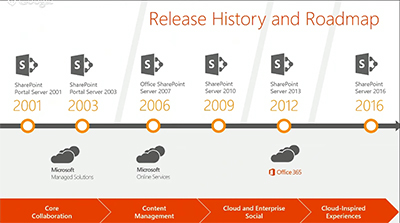
Office 365 cloud services have played a role since SharePoint Server 2013, and they will do so going forward with SharePoint Server 2016. "Everything we're doing in Office 365 inspires the [SharePoint Server] product going forward, and you'll see this cadence continuing," Kashman explained.
Office 365 is Microsoft's fastest growing product yet, and SharePoint Online is a "huge" part of that, Kashman said. Some of the four workloads in SharePoint Online have been growing at a rate that's been beyond Microsoft's expectations. They've grown since last year at a "400 percent monthly active user rate," Kashman said. And across sites with OneDrive for Business, Microsoft is seeing a "300 percent year-over-year growth."
SharePoint Server 2016 will have a more unified end user experience across components, Kashman promised.
"As we brought in some of our acquisitions, as we brought in other elements, part of our focus was to make sure it felt like a unified experience across all of the workloads: social, enterprise content management, sites and portals, personal files and whatnot."
Instead of managing five to six servers, IT pros now manage one unified server experience with the new SharePoint Server, Kashman added.
SharePoint Behind the Scenes
Microsoft has been moving its various technologies into the cloud, with new services such as Delve, Clutter and Groups, which are becoming part of "a common experience layer," rather than hanging out in separate application silos. This concept also applies to Office add-ins. It all will be part of a common framework for Office 365 experiences. Microsoft is taking these technologies, along with scalability improvements, and pushing them into SharePoint Server 2016, Kashman said.
Microsoft has been moving its various technologies into the cloud, with new services such as Delve, Clutter and Groups, which are becoming part of "a common experience layer," rather than hanging out in separate application silos. This concept also applies to Office add-ins. It all will be part of a common framework for Office 365 experiences. Microsoft is taking these technologies, along with scalability improvements, and pushing them into SharePoint Server 2016, Kashman said.
Kashman also answered his own question, "What is SharePoint?"
"It can be all or one thing. You can have a great search experience across file servers and third-party repositories. Or you can stand it up for your company intranet, or for your core collaboration sites and tons and tons more with BI and all of the active development. But the core essence of where we are taking, and how we think about SharePoint, is we are continuing the standards of releasing on-premises versions every two or three years and innovating in the cloud, sometimes every day with fixes and security updates, but certainly on the cadence of every week, every month, every quarter, we're releasing updates, new features and sometimes new experiences."
Some Office 365 technologies aren't being labeled as SharePoint, but they basically use SharePoint, Kashman explained. He pointed to Office Delve, which surfaces organizational information using Microsoft's FAST enterprise search technology as well as Office Graph technology. Delve works with Clutter, an Exchange feature that's used to prioritize e-mail messages in Outlook. Microsoft also has an Office 365 Video service that takes info from Office Graph.
"So SharePoint, in essence, could be Delve, or it could your company portal on premises," Kashman said.
Portals, Search and Files
Kashman said that Microsoft will be adding technologies to SharePoint, not replacing them. He highlighted three improvements coming in SharePoint Server 2016, namely Next-Generation Portals, Search and Files.
Kashman said that Microsoft will be adding technologies to SharePoint, not replacing them. He highlighted three improvements coming in SharePoint Server 2016, namely Next-Generation Portals, Search and Files.
Next-Generation Portals will have a simplified administration approach and it will be more personalized for end users. For instance, Next-Gen Portals will be connected to Yammer and will be mobile enabled. Microsoft will permit extensibility to these Next-Gen Portals for its partners to build upon, Kashman explained. He also later said that Microsoft will be building its "boards" feature into the Next-Gen Portals for knowledge management. The boards feature, based on Office Delve technology, lets end users organize content, such as documents related to a particular project.
Search improvements in SharePoint Server 2016 were equated with Delve, based on Office Graph technology. Delve will enable more personal discovery experiences for end users and will have governance controls for IT departments. There will be coming support for hybrid scenarios, too, namely organizations that combine the use of Office 365 services with SharePoint Server on premises. It's essentially SharePoint behind the scenes that powers Office Graph, Kashman explained.
Files in SharePoint 2016 will get improvements, which Kashman identified with OneDrive for Business. Previously, it was My Documents. The user experience is getting improved with OneDrive for Business. Mobile device management and data loss prevention capabilities are being added.
Converging Products
Microsoft has been converging its online and on-premises SharePoint products and now has "a more consistent code base," Kashman said. The new code base is helping to close the parity gap between the on-premises and online products.
Microsoft has been converging its online and on-premises SharePoint products and now has "a more consistent code base," Kashman said. The new code base is helping to close the parity gap between the on-premises and online products.
Microsoft also has been taking learnings from its Office 365 massive-scale cloud operations and bringing it down to its on-premises product, he added. Microsoft has become more agile, with a goal of no downtime when patching its SharePoint Online service, and that concept is filtering down to the server product.
"What we do now in the cloud is when we patch or manage the system we take no downtime," Kashman said. "With [SharePoint Server] 2016 we introduced this concept of zero downtime and we're super excited about bringing that to you on premises."
Kashman's talk is available on demand at this page (sign-up required). Signing up also provides access to about 73 other SPBiz talks for a limited period of time.
Kurt Mackie is senior news producer for the 1105 Enterprise Computing Group.
https://redmondmag.com/articles/2015/06/26/sharepoint-2016-cloud-first.aspx
https://redmondmag.com/articles/2015/06/26/sharepoint-2016-cloud-first.aspx

