Showing posts with label SharePoint 2010 Online. Show all posts

Wednesday, July 08, 2015

Microsoft Taking a 'Cloud First' Approach with SharePoint 2016

Microsoft Taking a 'Cloud First' Approach with SharePoint 2016


SharePoint Server 2016 will be a very cloud/inspired product when commercially released next year.

That idea seemed to be the main theme of a recent SPBiz Conference keynote talk by Mark Kashman, a senior product manager at Microsoft on the SharePoint team. Kashman's June 17 talk, "SharePoint Vision and Roadmap," offered a high-level view of SharePoint Server 2016, explaining its Office 365 origins. Microsoft is planning a beta release of the new server at the end of this year, with product release planned for Q2 2016.

Microsoft's cloud services have been looming in the background of prior SharePoint Server releases. Kashman illustrated this concept with the following slide:
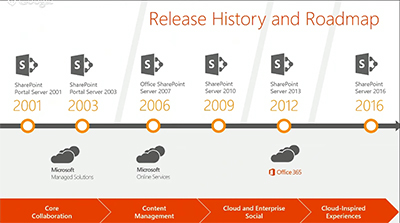


[Click on image for larger view.]Cloud support for Microsoft's SharePoint Server products. Source: 2015 SPBiz keynote.

Office 365 cloud services have played a role since SharePoint Server 2013, and they will do so going forward with SharePoint Server 2016. "Everything we're doing in Office 365 inspires the [SharePoint Server] product going forward, and you'll see this cadence continuing," Kashman explained.

Office 365 is Microsoft's fastest growing product yet, and SharePoint Online is a "huge" part of that, Kashman said. Some of the four workloads in SharePoint Online have been growing at a rate that's been beyond Microsoft's expectations. They've grown since last year at a "400 percent monthly active user rate," Kashman said. And across sites with OneDrive for Business, Microsoft is seeing a "300 percent year-over-year growth."

SharePoint Server 2016 will have a more unified end user experience across components, Kashman promised.

"As we brought in some of our acquisitions, as we brought in other elements, part of our focus was to make sure it felt like a unified experience across all of the workloads: social, enterprise content management, sites and portals, personal files and whatnot."
Instead of managing five to six servers, IT pros now manage one unified server experience with the new SharePoint Server, Kashman added.

SharePoint Behind the Scenes
Microsoft has been moving its various technologies into the cloud, with new services such as Delve, Clutter and Groups, which are becoming part of "a common experience layer," rather than hanging out in separate application silos. This concept also applies to Office add-ins. It all will be part of a common framework for Office 365 experiences. Microsoft is taking these technologies, along with scalability improvements, and pushing them into SharePoint Server 2016, Kashman said.  
Kashman also answered his own question, "What is SharePoint?"
"It can be all or one thing. You can have a great search experience across file servers and third-party repositories. Or you can stand it up for your company intranet, or for your core collaboration sites and tons and tons more with BI and all of the active development. But the core essence of where we are taking, and how we think about SharePoint, is we are continuing the standards of releasing on-premises versions every two or three years and innovating in the cloud, sometimes every day with fixes and security updates, but certainly on the cadence of every week, every month, every quarter, we're releasing updates, new features and sometimes new experiences."
Some Office 365 technologies aren't being labeled as SharePoint, but they basically use SharePoint, Kashman explained. He pointed to Office Delve, which surfaces organizational information using Microsoft's FAST enterprise search technology as well as Office Graph technology. Delve works with Clutter, an Exchange feature that's used to prioritize e-mail messages in Outlook. Microsoft also has an Office 365 Video service that takes info from Office Graph.
"So SharePoint, in essence, could be Delve, or it could your company portal on premises," Kashman said.
Portals, Search and Files
Kashman said that Microsoft will be adding technologies to SharePoint, not replacing them. He highlighted three improvements coming in SharePoint Server 2016, namely Next-Generation Portals, Search and Files.
Next-Generation Portals will have a simplified administration approach and it will be more personalized for end users. For instance, Next-Gen Portals will be connected to Yammer and will be mobile enabled. Microsoft will permit extensibility to these Next-Gen Portals for its partners to build upon, Kashman explained. He also later said that Microsoft will be building its "boards" feature into the Next-Gen Portals for knowledge management. The boards feature, based on Office Delve technology, lets end users organize content, such as documents related to a particular project.
Search improvements in SharePoint Server 2016 were equated with Delve, based on Office Graph technology. Delve will enable more personal discovery experiences for end users and will have governance controls for IT departments. There will be coming support for hybrid scenarios, too, namely organizations that combine the use of Office 365 services with SharePoint Server on premises. It's essentially SharePoint behind the scenes that powers Office Graph, Kashman explained.
Files in SharePoint 2016 will get improvements, which Kashman identified with OneDrive for Business. Previously, it was My Documents. The user experience is getting improved with OneDrive for Business. Mobile device management and data loss prevention capabilities are being added.
Converging Products
Microsoft has been converging its online and on-premises SharePoint products and now has "a more consistent code base," Kashman said. The new code base is helping to close the parity gap between the on-premises and online products.
Microsoft also has been taking learnings from its Office 365 massive-scale cloud operations and bringing it down to its on-premises product, he added. Microsoft has become more agile, with a goal of no downtime when patching its SharePoint Online service, and that concept is filtering down to the server product.
"What we do now in the cloud is when we patch or manage the system we take no downtime," Kashman said. "With [SharePoint Server] 2016 we introduced this concept of zero downtime and we're super excited about bringing that to you on premises."
Kashman's talk is available on demand at this page (sign-up required). Signing up also provides access to about 73 other SPBiz talks for a limited period of time.
About the Author
Kurt Mackie is senior news producer for the 1105 Enterprise Computing Group.

https://redmondmag.com/articles/2015/06/26/sharepoint-2016-cloud-first.aspx

Monday, June 20, 2011

Office Web Apps vs. Google Cloud Connect: Which is the Better Solution for Microsoft Office Users?

Microsoft is walking an interesting line between the successful but traditional software products of the past—Windows, Office, and so on—and its cloud-based future, which can be seen in such products as Windows Azure, Office 365, and Windows Intune, the cloud-based PC management service. During this time of transition, the company must continue updating and servicing its on-premises solutions while pushing customers, gently, toward more cost-effective and scalable cloud solutions.

This situation is beneficial to customers, since Microsoft often provides an interesting mix of on-premises and hosted solutions, giving customers more choice. So when you look at something like office productivity, you see on-premises products such as Microsoft Office, hosted versions such as the Office Web Apps, and then ancillary solutions such as SharePoint, which also come in both traditional and hosted versions. You can mix and match between these and related solutions, so a customer could provide part of its Exchange infrastructure in house, and part of it could be hosted in the cloud with federation linking the two together for management and integration purposes.

Office is also a great example because it's one of Microsoft's core product lines and a top driver of revenue. In fiscal year 2010, for example, Office revenues represented 30 percent of the company's overall revenues of $62.5 billion, or the same as for Windows. And that fiscal year ended just as Office 2010 was released, a release Microsoft has described as its fastest selling ever at retail.

But we're in this age of transition. And during this time, Microsoft is vulnerable, because users may move on to other hosted office productivity offerings as they make their own transitions to the cloud. One primary competitor here is Google Docs and Google Apps. These solutions haven't received much traction with larger businesses yet, and they won't until they've matured quite a bit. But they're free, and appeal to individuals and very small businesses as a result.

Google, of course, isn't standing still. Recognizing that customers still know and even love Microsoft Office, the company has created various integration tools over the years that bridge the gap between its free and cheap online services and Microsoft's Windows-based software. And this past week, the company delivered a tool called Google Cloud Connect that drives home Google's strategy in this market. Which is: we'll work with what you use today, with an eye toward getting you to migrate away from Office in the future.

It's a good idea. And one that should—and does—alarm Microsoft.

To understand why, it's necessary to examine how Google Cloud Connect differs from the Microsoft approach. Installed on client PCs, Google Cloud Connect is essentially a plug-in that appears as a toolbar in Microsoft Word, Excel, PowerPoint 2003, 2007, and 2010. You must logon to a Google account, and then choose sync settings, which can be automatic or manual. When used in the default automatic sync mode, each Office document you create or edit is automatically saved, or synced, in your Google Docs repository as you work. This is itself a powerful bit of functionality, since it provides crucial off-site backups, essentially, of your documents.

Google Cloud Connect also provides basic collaboration capabilities, allowing multiple users to edit a supported document type simultaneously, but, curiously, only using Microsoft's Office applications. That is, you can't use Google's own cloud-based Google Docs tools to work collaboratively with others using Office.

In fact, you can't use Google Docs at all: Documents synced to Google's servers are stored in Microsoft formats, and while you can convert them to something Google understands for later processing, the results are often terrible, with butchered formatting, even with very basic Word 2010 documents.

And like most Google solutions, Cloud Connect isn't exactly enterprise friendly. It needs to be manually installed on a per-PC basis. So it targets the same individuals and very small businesses as other Google products.

What Google Cloud Connect gets right, in my opinion, is the seamless integration with cloud backup. Even if you never intend to use Google Docs, this is a pretty good way to ensure that each document you work with ends up in the cloud, if only for backup purposes. And while there are some application reliability issues—Word has spazzed out on me temporarily a few times this past week—it does get the job done.

Microsoft is making its own play for hosted productivity. And while its Office Web Apps aren't as full-featured as their traditional counterparts—they're not even available offline, for starters—Microsoft is also offering customers ways to integrate its rich, client-side Office suite in useful ways with various cloud services as an interim step.

So what does Microsoft offer? Does it have a credible response to Cloud Connect?

Sunday, June 19, 2011

Rubicon richt SharePoint Project- en Samenwerkingsomgeving en Document Management in bij het Admiraal De Ruyter Ziekenhuis.

Rubicon richt SharePoint Project- en Samenwerkingsomgeving en Document Management in bij het Admiraal De Ruyter Ziekenhuis.

Rubicon gaat bij het Admiraal De Ruyter Ziekenhuis de Project- en samenwerkingsomgeving en het Document Management verder inrichten met als doel het verhogen van de efficiëntie van de medewerkers.

Vianen, 31-05-2011: Nu het Admiraal De Ruyter Ziekenhuis (ADRZ) de beschikbaarheid van gedigitaliseerde patiëntendossiers op basis van SharePoint 2010 online heeft gerealiseerd, is het tijd voor de volgende stap. In de volgende stap gaat het ADRZ verder met de realisatie van het verhogen van de efficiëntie van de medewerkers door het verder verbeteren van de project- en samenwerkingsomgeving en het inrichten van document management. Het ADRZ heeft hiervoor Rubicon gekozen als haar SharePoint partner. Een leverancier die zowel de IT, functioneel beheer en business aspecten van SharePoint begrijpt en over kan dragen aan het ziekenhuis.

Hiermee voldoet Rubicon aan de wensen die het ADRZ stelt aan een partner met toegevoegde waarde. Rubicon heeft inmiddels bij meerdere zorginstellingen SharePoint oplossingen geïmplementeerd. Op basis van haar SharePoint ZorgPortaal weet Rubicon de juiste functionele vraagstelling van ziekenhuizen te beantwoorden. Rubicon biedt het ADRZ dan ook full service SharePoint dienstverlening.

In 2010 koos het ADRZ voor het SharePoint platform als basis voor het aan zorgprofessionals beschikbaar stellen van gedigitaliseerde patiëntendossiers. Rubicon realiseerde een infrastructuur op basis van een degelijk ontwerp en verzorgde de installatie van de SharePoint 2010 omgeving. Bij het opstellen van het ontwerp is door Rubicon in samenwerking met ADRZ vanaf de start rekening gehouden met toekomstige functionele wensen betreffende dit platform, waardoor vervolgtrajecten als het verbeteren van de project- en samenwerkingsomgeving en het inrichten van document management, goed aansluiten op de bestaande infrastructuur.

Rubicon en het ADRZ hebben een roadmap opgesteld voor de komende jaren. Dit geeft het ziekenhuis de mogelijkheid om het platform in beheersbare stappen binnen ADRZ verder in gebruik te nemen. Door gebruik te maken van functionele domeinen krijgen afdelingen nieuwe en eenvoudigere IT diensten geboden ter ondersteuning van ziekenhuisbrede samenwerking. In de eerste fase van deze roadmap realiseert Rubicon de onderdelen collaboratie, project management, document management en de “Mijn ADRZ” omgeving. Het resultaat hiervan is dat medewerkers beter kunnen samenwerken, elkaar beter kunnen vinden en documenten en informatie eenvoudiger gedeeld en (terug)gevonden kunnen worden.

De samenwerkingsomgeving geeft de organisatie de mogelijkheid om in afdeling overschrijdende teams samen te werken. Het is dé standaard omgeving, waarin plaats is voor gedeelde documenten, taken, een agenda, forum en meer. Dit maakt het voor de gebruikers mogelijk om centraal informatie en kennis te delen. Daarnaast wordt er een project management omgeving ingericht, op basis van het “Rubicon Project Bureau”. Dit laatste is een op Prince2 gebaseerde en gestructureerde omgeving om projectmatig samen te werken, van projectaanvraag tot het automatisch aanmaken van projectsites en dit alles ondersteund door één workflow.

In de eerste fase wil het ADRZ tevens documenten van personen en afdelingen in SharePoint onderbrengen. Hiertoe wordt een documenten centrum ingericht met de gewenste document classificaties van het ADRZ. Hierdoor komen functionaliteiten zoals bijvoorbeeld versiebeheer beschikbaar en wordt een verbetering van de vindbaarheid van documenten gerealiseerd. Hiertoe wordt de Enterprise zoekmachine en Social Tagging ingezet. Beide, standaard functionaliteiten van SharePoint 2010.

“Mijn ADRZ” geeft de gebruiker de mogelijkheid om persoonlijke documenten op te slaan op zijn of haar eigen SharePoint plek. Naast het profiel met een rijke set aan Social Features, heeft Rubicon een aantal webparts toegevoegd, waarmee de gebruiker zijn of haar taken, agenda en emails ook in de browser kan zien.
“Mijn ADRZ” wordt daarmee een centrale plaats waar de medewerker snel via de browser zijn of haar informatie beschikbaar heeft.

Rubicon realiseert elke fase als project en zorgt ervoor dat ieder project vanaf het ontwerp, de realisatie, training van de gebruikers tot aan de overdracht naar de beheerorganisatie goed geregeld wordt.
De realisatie van de diverse onderdelen gebeurt middels een iteratieve aanpak in nauwe samenwerking met de medewerkers van het ziekenhuis. Dit zorgt voor korte communicatielijnen en duidelijke verwachtingen bij zowel het ADRZ als bij Rubicon. Het succes van een project zit volgens Rubicon dan ook grotendeels in de menselijke factor. Daarnaast moeten de oplossingen niet alleen eenvoudig over te dragen zijn naar de gebruikers binnen het ziekenhuis en het werk eenvoudiger maken, maar dienen deze ook beheersbaar te zijn en beheersbaar te blijven voor de IT organisatie van het ziekenhuis.

Over ADRZ
Het Admiraal De Ruyter Ziekenhuis biedt medisch specialistische zorg in Noord- en Midden Zeeland en heeft locaties in Goes, Middelburg, Vlissingen en Zierikzee. Meer informatie vindt u op www.adrz.nl

Over Rubicon
Rubicon is een toonaangevende Microsoft dienstverlener met ruime ervaring in de gezondheidszorg. Middels het inzetten van innovatieve ICT oplossingen maakt Rubicon het voor organisaties mogelijk om de performance inzichtelijk te maken en de efficiency en communicatie te verbeteren. Met een verhoogde service en kwaliteit tot gevolg. Als ICT adviespartner geeft Rubicon zorginstellingen, maar ook organisaties binnen diverse andere branches, toegang tot hoogwaardige kennis en volledige technologische ondersteuning. Voor meer informatie: www.rubicongroup.nl